The next step in the process is to create the categories, if you want to bundle your items into categories. (Do not confuse this term with the item category 1-6 in IBS Enterprise.).
- Click Catalogue elements.
- Click New.
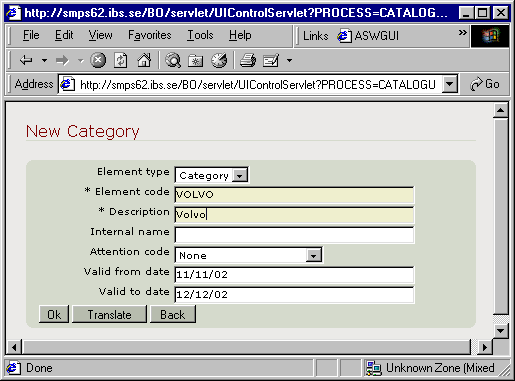
- You access the New category window:
- Element type
- Category is defaulted.
- Element code
- Enter the name of the category element.
- Description
- Enter the description. You can also translate the descriptions into any supported language.
- Internal name
- Unless manually entered, the internal name is automatically set to the same as the description, but with upper case letters.
- Attention code
- Select the applicable attention code from the drop down list, if any, to be assigned to this catalogue.
- Valid from date
- Optional entry. Enter the date from which the category is valid.
- Valid to date
- Optional entry. Enter the date to which the category is valid.
Panel image
Complete the following information:
Click OK. Exit the routine.